How to set up Round Robin meeting types in lemcal

Understand how to share your calls with your teammates

Round Robin helps you distribute incoming meetings across multiple team members in a fair, rotating pattern, while still taking availability and priority into account.

By the end of this tutorial, you’ll know how to create a Round Robin meeting type, add and manage hosts, use the star priority system correctly, and troubleshoot why meetings may not be assigned the way you expect.

Note: this feature is available only on lemcal Pro plan.

Why this matters

Round Robin is useful when you want to share booking volume across a team instead of sending every meeting to a single person. It helps teams handle demand more efficiently while still respecting each host’s availability and giving higher-priority members a larger share of bookings.

Before you begin

  • Round Robin is available only on the lemcal Pro plan.
  • You should already have team members added to your workspace.
  • Each selectable host must have a valid lemcal setup, including a connected calendar and configured availability.
Important: Round Robin does not guarantee a strict sequence or perfectly equal distribution. Meeting assignment is influenced by availability first and priority (stars) second.

How Round Robin works

At a basic level, Round Robin rotates meetings across your selected hosts. A simple example looks like this:

  • Person 1 → first meeting
  • Person 2 → second meeting
  • Person 3 → third meeting
  • Person 1 → fourth meeting

That pattern continues, but in real use, lemcal also checks whether each person is actually available at the chosen time. If someone isn’t available, they won’t be assigned that meeting.

Phase 1: Create the Round Robin meeting type

1. Go to Meeting types, click New meeting type, and choose Round robin. This creates a new meeting type designed for team-based distribution rather than a single host.

Meeting types page showing New meeting type and Round robin option

2. Enter the basic details for the meeting type, such as the meeting name and scheduling link. This is what your invitees will see when booking.
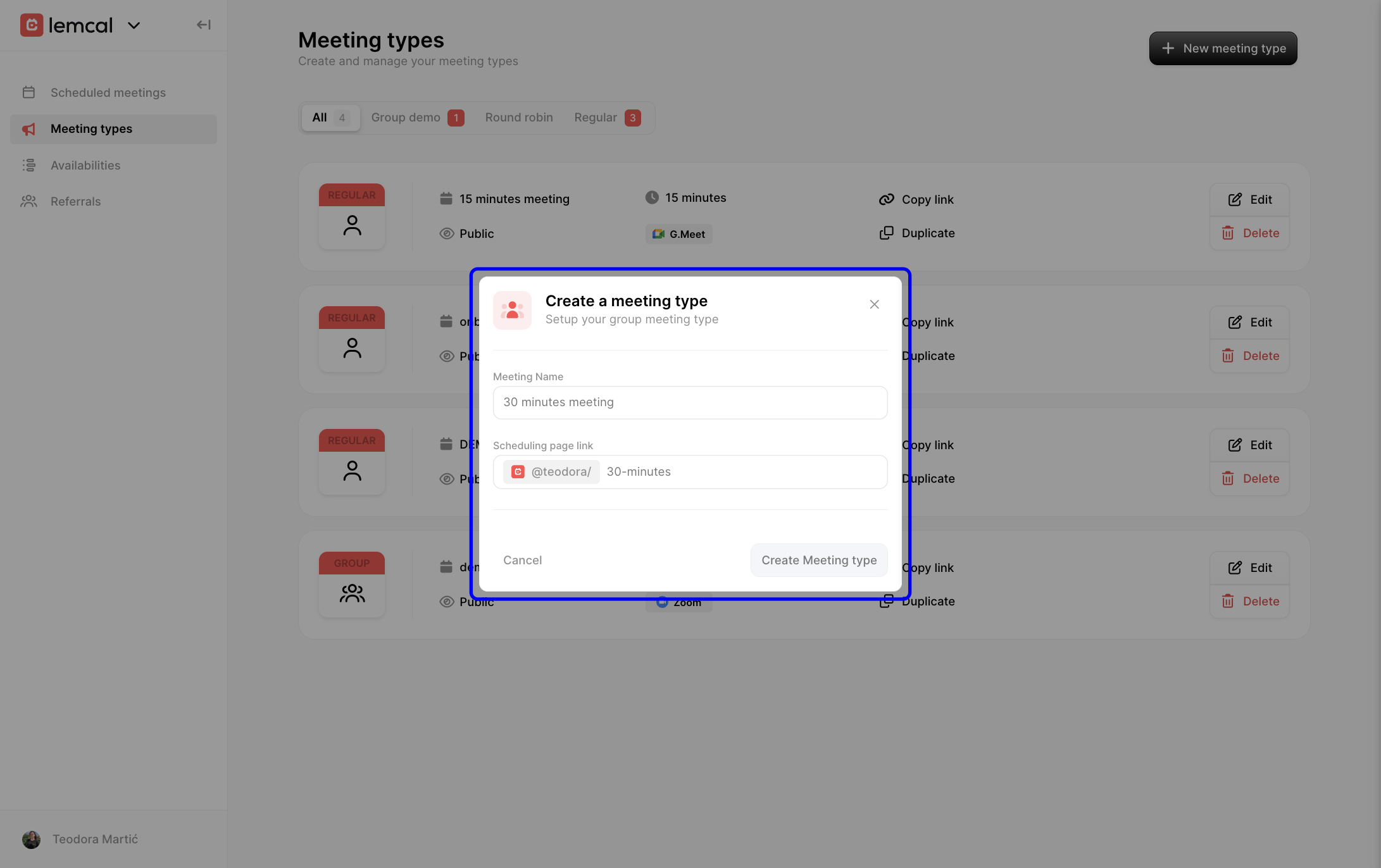
Create a meeting type modal for entering initial meeting details

Phase 2: Configure the meeting details

After creating the meeting type, you can customize the booking experience just like other meeting types in lemcal.

In General, set the Meeting Name, Scheduling page link, Description, Duration, Event location, optional redirect URL, and any additional guests you want included automatically. These settings control what bookers see and how the meeting behaves.

General settings for a round robin meeting type showing editable meeting details

Phase 3: Add hosts to the Round Robin rotation

1. Open the Round robin section, then use Choose team member to add eligible hosts to the rotation. Only team members with a valid lemcal setup can be selected.

Round robin settings showing team member selector

2. Select a team member from the dropdown list to include them in the meeting rotation.
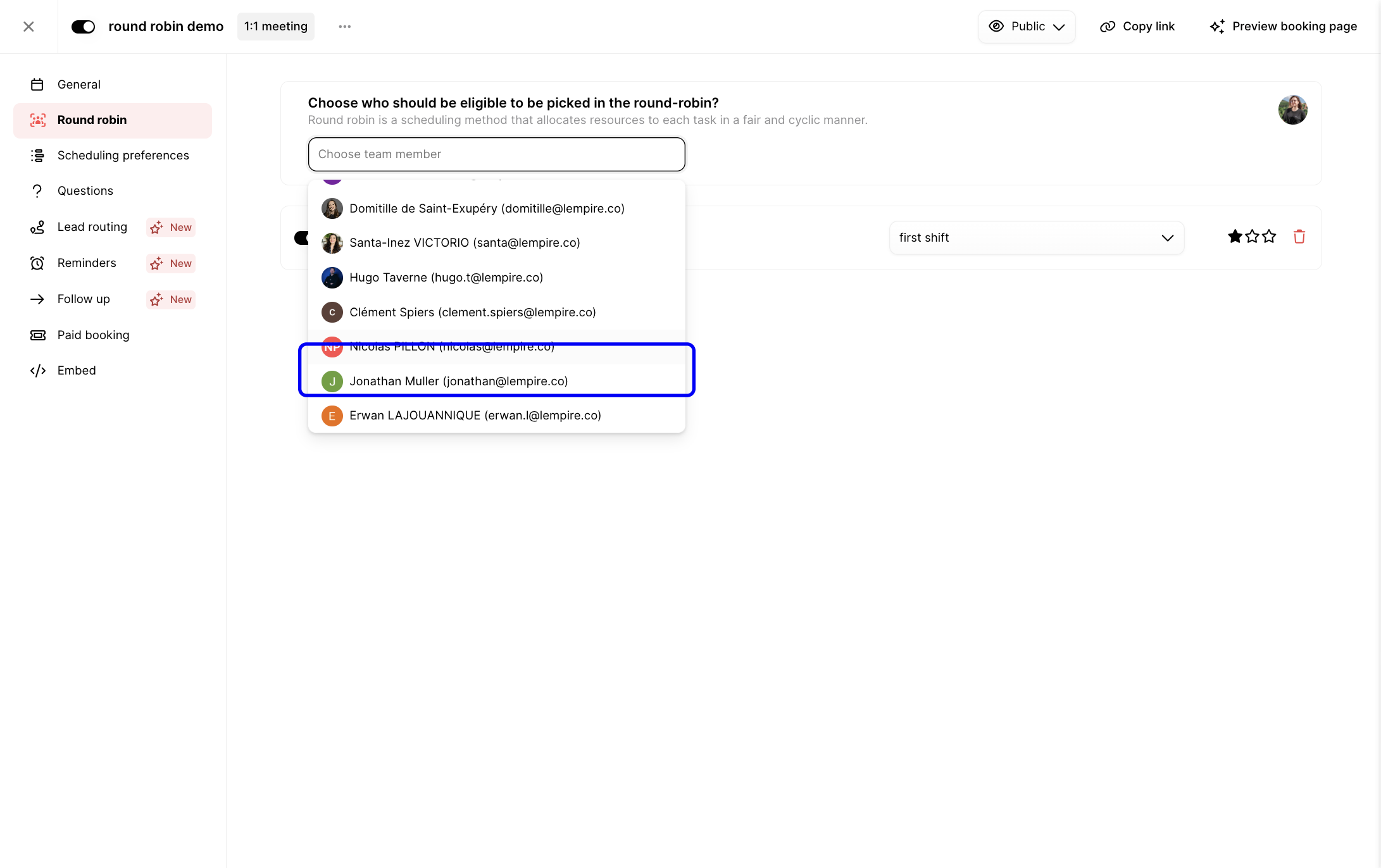
Team member dropdown list for adding hosts to a round robin meeting

3. For each host, you can enable or disable them in the rotation and choose which availability schedule they should use. This is helpful when a team member has multiple schedules or shift patterns.
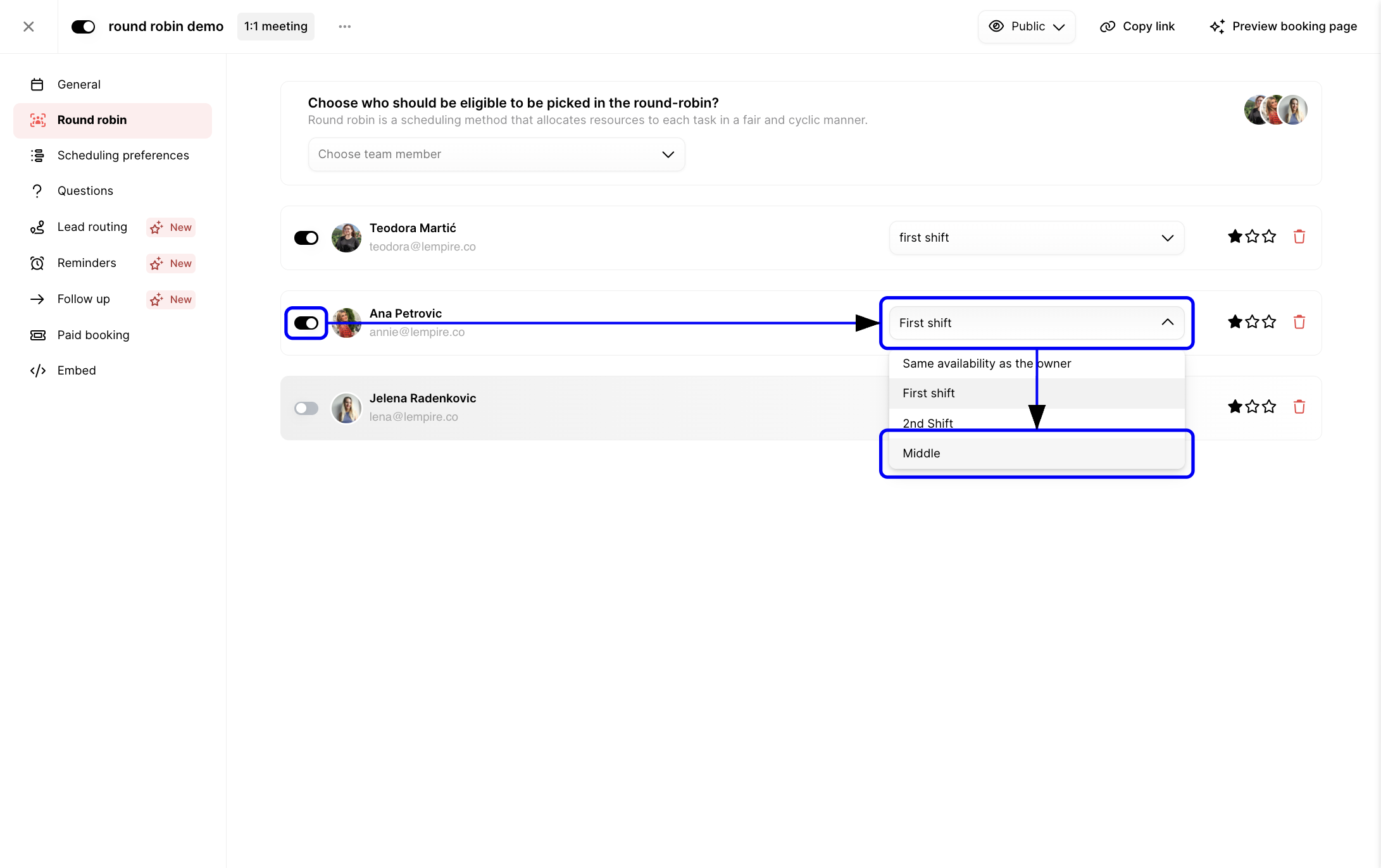
Round robin host settings showing toggle and schedule selection

When you add team members, lemcal displays each person’s individual availability setup. Round Robin will only offer times where at least one eligible host is available.

Phase 4: Use the star system to set priority

The star system is one of the most important parts of Round Robin.

Each host gets a number of stars:

  • More stars = higher priority
  • Fewer stars = lower priority

Click the stars next to a host to increase or lower their priority.
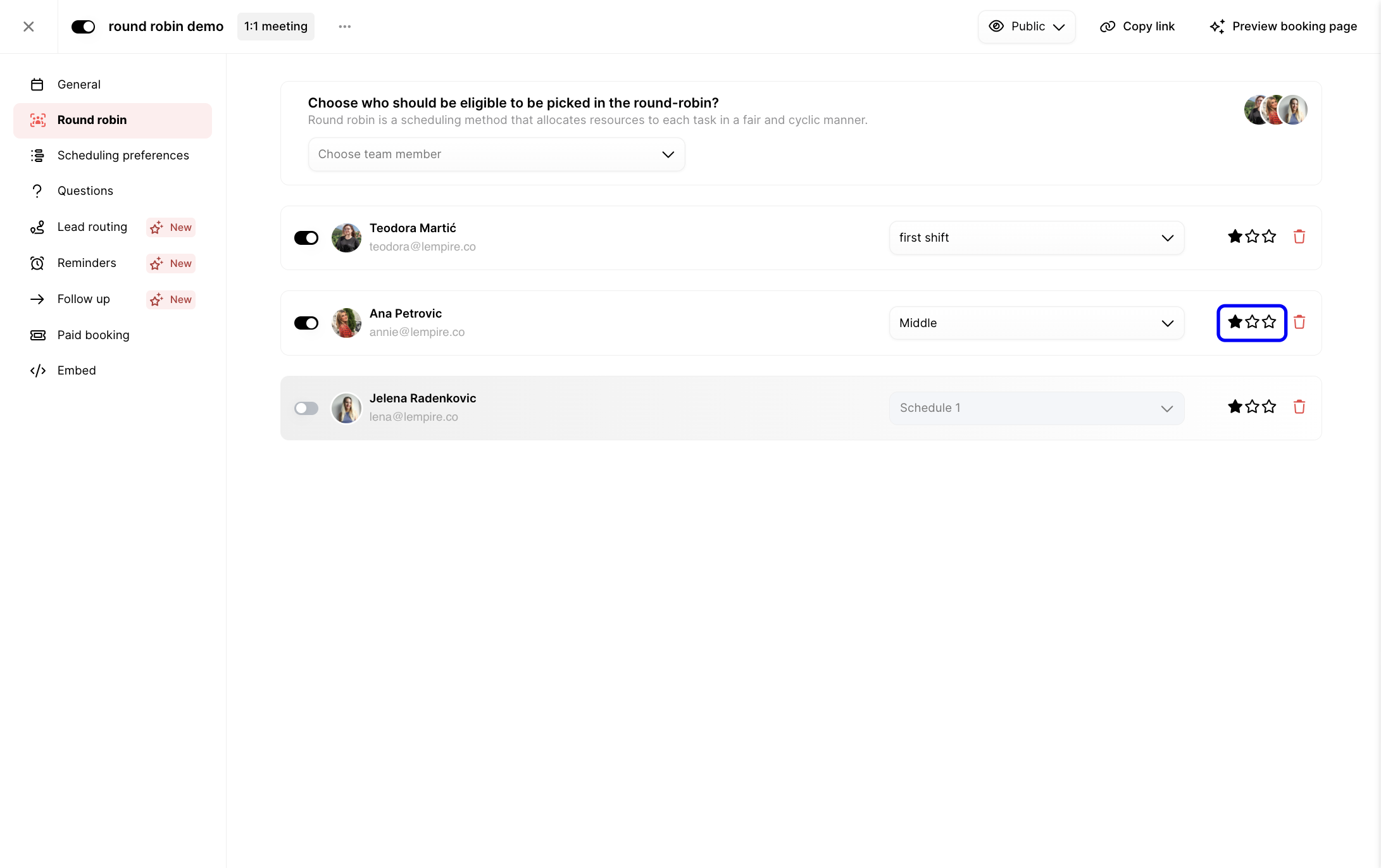
Round robin host row showing star priority controls

What priority really means: Stars increase the probability that a host will receive more meetings, but they do not make that host exclusive.

For example, if Host A has 3 stars and Hosts B and C have 1 star each, lemcal does not assign meetings in a strict “A, A, A, B, C” pattern. Instead, Host A is more likely to receive a larger share of meetings over time, while B and C still remain part of the rotation.

If all hosts have the same number of stars, distribution is more even.

Common misunderstandings about stars

  • “If I have three stars, I should get all meetings.”
    False. You get more meetings, not all meetings.
  • “If someone has one star, they should get no meetings.”
    False. They still participate in the rotation.

Phase 5: Remove or edit hosts

You can update the Round Robin host list at any time.

  • To remove someone, click the remove icon next to their name. They are instantly removed from the rotation.
Round robin host row showing remove icon
  • To change priority, adjust their stars.
  • To change availability, select a different schedule from their dropdown.

If a person has no availability, lemcal simply won’t assign meetings to them.

How lemcal decides who gets the meeting

When a booker selects a time, lemcal checks the following in order:

  1. Availability
    A host must be available for the selected time slot. If only one host is available, the meeting goes to that person.
  2. Priority (Stars)
    If multiple hosts are available, hosts with more stars are favored.
  3. Fair distribution
    Even with priority applied, the system still balances meeting allocation across the team over time.

Round Robin is not:

  • A guaranteed equal distribution system
  • A strict sequence generator
  • A way for one host to monopolize all meetings
  • A replacement for availability management

How Round Robin works with availability

Round Robin respects each person’s own schedule.

Example:

  • You work Monday to Thursday
  • Anna works Tuesday to Friday
  • Jelena works only Wednesday

lemcal will:

  • Show only slots where at least one host is available
  • Assign the meeting to the host who is available and best fits the priority logic

This means unexpected assignments often come from schedule differences, not from a system error.

Optional settings you may want to review

Once your Round Robin hosts are configured, you can fine-tune the rest of the booking workflow:

  • Scheduling preferences for notice periods, buffers, slot increments, and daily meeting limits
Scheduling preferences settings for a round robin meeting type
  • Questions to collect extra information before the meeting
Question builder for booking form questions
  • Lead routing if you want answers to direct or filter bookings using custom logic
Lead routing rules showing condition and action setup
  • Reminders for automatic pre-meeting emails
Reminder settings with reminder message editor
  • Follow up for automatic post-meeting communication
Follow-up settings with follow-up email editor

Practical example

Let’s say you have three sales reps in one Round Robin meeting type:

  • Ana → 3 stars
  • Mark → 1 star
  • Nina → 1 star

If all three are available for the same slot, Ana is more likely to receive the booking. But Mark and Nina still remain eligible, and they will still receive meetings over time.

If Ana is unavailable for a selected slot, lemcal chooses between Mark and Nina instead. In other words, availability always comes before priority.

Troubleshooting and common pitfalls

Issue: “I added someone, but I can’t select them in Round Robin”

Root cause: The team member does not have a valid lemcal setup.

Fix:

  • Make sure their calendar is connected
  • Make sure they have availability configured
  • Refresh the Round Robin setup and try again

Issue: “I gave someone 3 stars, but they still aren’t getting every meeting”

Root cause: Stars affect probability, not exclusivity.

Fix:

  • Explain that higher priority increases share, not total control
  • Review whether other hosts are also available for the same slots
  • Confirm that the current behavior matches expected product design

Issue: “My teammate got the meeting even though I was free”

Root cause: Round Robin balances availability and fair distribution, not just visible calendar openings.

Fix:

  • Compare star settings across hosts
  • Check whether the teammate had equal or higher priority
  • Review notice periods, buffers, overrides, and max meetings per day

Issue: “There are no available slots on my Round Robin meeting type”

Root cause: One or more scheduling rules may be blocking bookable time.

Fix:

  • Check each host’s availability
  • Review minimum and maximum notice
  • Review buffers and date overrides
  • Check daily meeting limits

Issue: “I removed someone, but distribution still feels uneven”

Root cause: Future bookings use the new setup, but previous bookings remain assigned as they were.

Fix:

  • Confirm the host was removed from the current rotation
  • Test with new bookings only
  • Review remaining hosts’ availability and stars

Best practices

  • Use equal stars when you want a more even distribution
  • Use more stars only when one person should receive a larger share, not all meetings
  • Review host availability regularly so assignments stay accurate
  • Test your Round Robin page with a few sample bookings before sharing it publicly

Summary

Round Robin in lemcal is a team scheduling method that distributes meetings across multiple hosts. It respects each host’s availability, uses stars to influence priority, and keeps distribution balanced over time rather than locking meetings into a strict sequence.